When certificates needs to be renewed or changed on (on-premise) Exchange server’s, and you have Microsoft 365 hybrid setup though Hybrid Configuration Wizard, a Office 365 connecter is setup as send and receive:
Receive:

Send:

If you try to delete the old certificate, without setting the new cert for the connectors, you will get this in ECP:
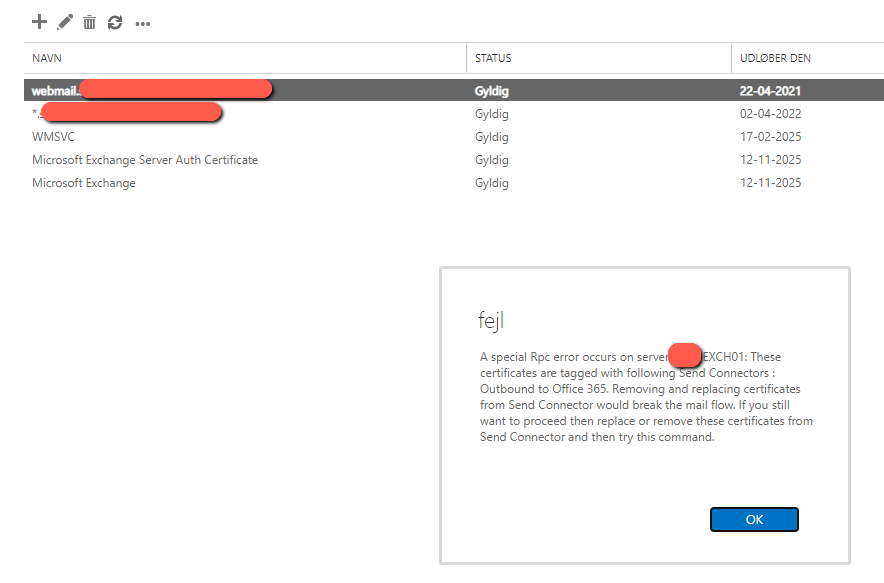
“A special Rpc error occurs on server EXCH01: These certificates are tagged with following Send Connectors : Outbound to Office 365. Removing and replacing certificates from Send Connector would break the mail flow. If you still want to proceed then replace or remove these certificates from Send Connector and then try this command.”
#Set Variable
$OldThumb = "xxxxxxxxxxxxxxxx"
$NewThumb = "xxxxxxxxxxxxxxxx"
$SendConnector = "Outbound to Office 365 - a296"
$ReceiveConnector = "EXCH2019\Default Frontend EXCH2019"

# Store the certificate object based on its unique thumbprint
$cert = Get-ExchangeCertificate -Thumbprint $NewThumb

# Use the certificate's thumbprint directly to identify it
$tlsCertName = "<i>$($Cert.Issuer)<s>$($Cert.Subject)"

# Remove corrent connector association
Set-SendConnector $SendConnector -TlsCertificateName $null
Set-ReceiveConnector $ReceiveConnector -TlsCertificateName $null

#Remove old certificate
Remove-ExchangeCertificate -Thumbprint $OldThumb

# Set the Send Connector to use the certificate
Set-SendConnector $SendConnector -TlsCertificateName $tlsCertName

# Set the Receive Connector to use the same certificate
Set-ReceiveConnector $ReceiveConnector -TlsCertificateName $tlsCertName
Note that if you fail to replace your certificate before it expires (You forgot to), your mailflow between on-prem Excahnge and Exchange Online (365) will stop working and you will see this in the logs:
[Message=451 5.7.3 STARTTLS is required to send mail]